
AI analytics workflow
Use a scope-first MCP workflow to analyze creative performance, inspect statistical evidence, and turn a supported pattern into the next controlled test.
Ask the agent to establish the scope before it ranks anything. It needs the readable account, exact filters, date range, and available data. From there, it can run a focused query, check any maturity or aggregation warnings, and read attribute findings in context. The result should be a testable creative brief, not a budget change.
The walkthrough below runs on a deterministic synthetic fixture. Its names, dates, URLs, and performance values are fictional. It shows the reasoning sequence, not a Lemon AI customer result or an industry benchmark.
Start by discovering the account, not by ranking the ads
A UA lead might ask:
For the US iOS prospecting campaign, which hook should the next video batch preserve? Use CPI for July 9 to July 15. Show the evidence and limitations. Do not change campaigns or budgets.
The prompt still leaves basic choices open. Which connected ad account contains the campaign? Does the campaign label match exactly, and does the date range contain data? US could be a country value or part of the campaign naming convention. iOS might sit under platform or operating system. The prompt also says nothing about how much delivery makes a creative comparable.
So the first calls discover scope:
list_ad_accounts()

list_filter_values(
  filter_type="date_range",
  ad_network_account_ids=["<discovered-account-id>"]
)

list_filter_values(
  filter_type="campaign_name",
  date_from="2026-07-09",
  date_to="2026-07-15",
  ad_network_account_ids=["<discovered-account-id>"]
)

list_filter_values(filter_type="country", ...)
list_filter_values(filter_type="os", ...)
MCP clients can discover available tools and their input schemas. The agent still has to use what it discovers. A guessed campaign name or the first readable account can produce a syntactically valid call against the wrong population.
Before querying performance, write down the resolved scope:
| Decision field | Resolved value |
|---|---|
| Account | The returned account ID, provider, currency, and supported outcome windows |
| Population | Exact campaign, country, OS, platform, app, and asset type values |
| Observation | July 9 through July 15 in the reporting contract’s date boundary |
| Outcome | CPI, with impressions, cost, and installs as its components |
| Delivery floor | A declared minimum impressions or spend rule |
| Prohibited action | No campaign, creative, or budget mutation |
If the account advertises provider-qualified outcome windows, copy the returned suffix instead of inventing one. A later ROAS question may need a metric such as roas:d7, while another source can expose a different valid suffix. The label is part of the metric definition.
Make every creative row answer one question
The main read should request only the fields needed to answer the decision. For a CPI comparison, those are the delivery components and CPI, not every available metric:
query_creative_performance(
  date_from="2026-07-09",
  date_to="2026-07-15",
  metrics=["impressions", "cost", "installs", "cpi"],
  ad_network_account_ids=["<discovered-account-id>"],
  asset_types=["video"],
  campaign_names=["<exact-discovered-campaign>"],
  countries=["US"],
  platforms=["ios"],
  min_impressions=<declared-floor>,
  sort_by="cpi",
  sort_order="ascending",
  limit=25
)
One row should represent one creative under one explicit comparison scope. Adding campaign, country, or date to group_by changes the reporting grain and can produce several rows for the same file. That may be correct for diagnosis, but it is not the same question as ranking creative files.
A ratio should travel with its components. CPI is cost divided by installs. ROAS is revenue divided by cost. When rows are combined, ratios must be recomputed from their additive components rather than averaged across assets.
For a deeper treatment of metric grain, outcome windows, and provenance, read the marketing analytics API and MCP guide and the asset-level creative ROAS guide.
Stop when the payload says the comparison is unsafe
The agent may sound confident even when the payload says the data is incomplete. Read the warnings before accepting its ranking.
| Returned condition | Unsafe conclusion it blocks | Required response |
|---|---|---|
| truncated: true | “These are the best creatives in the campaign” | Narrow the filters or raise the bounded limit before ranking |
| partial: true for an outcome window | “This recent cohort has final D7 or D30 ROAS” | Move the end date back or label the result as still maturing |
| non_additive: true | “Summing these asset values reconstructs the campaign total” | Compare supported rows at their stated grain and do not sum them |
| Missing or suppressed rows | “No other pattern exists” | Report the coverage and floor that excluded candidates |
| Too little delivery | “The observed rate is stable enough to brief against” | Increase the observation window or wait for more delivery |
Suppose a D7 query ends on July 15 but its metadata says data is fully mature only through July 12. The correct response is not to hide three immature days inside a weekly average. Either end the comparison on July 12 or state that July 13 through July 15 can still move.
When a result is truncated, resist the urge to paginate and dump everything into the context window. Narrow the question first: one app, one campaign family, one platform, one country, one asset type, and a defensible delivery floor. A smaller payload is easier for both the agent and the human reviewer to audit.
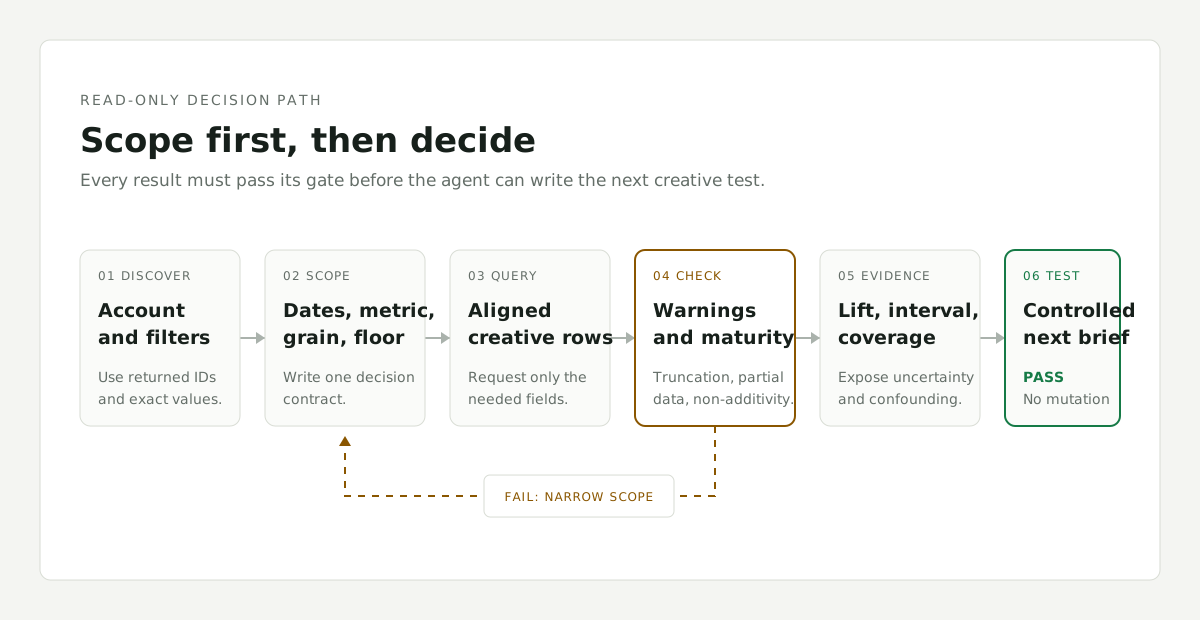
Move to the next step only after the previous gate passes. If a warning remains unresolved, narrow the scope and rerun the query.
A winning file is not yet a creative rule
The lowest-CPI file tells you what won in the selected period. It does not tell you which creative decision caused the result or what the next production batch should preserve.
Move from files to an account’s defined attribute vocabulary:
list_creative_attributes()

attribute_insights(
  date_from="2026-07-09",
  date_to="2026-07-15",
  metrics=["cpi"],
  ad_network_account_ids=["<discovered-account-id>"],
  asset_types=["video"],
  campaign_names=["<exact-discovered-campaign>"],
  countries=["US"],
  platforms=["ios"],
  min_impressions=<same-floor>,
  min_assets=<declared-attribute-floor>,
  min_spend=<declared-spend-floor>
)
Keep the performance and attribute scopes identical. Changing the dates, campaign, geography, asset type, or delivery floor between calls makes the file ranking and pattern analysis answer different questions.
Attribute results should compare a group with the rest of the eligible population and preserve the supporting evidence. Useful fields include the group and complement rates, lift interval, raw p value, false discovery rate adjusted q value, number of comparisons, coverage, effective asset counts, and attributes that are entangled with the finding.
Read the evidence before you write the next brief
The synthetic fixture produces this reasoning ledger:
| Observed pattern | Group versus rest | Reported lift | Evidence | Limitation |
|---|---|---|---|---|
| UGC selfie hook on video CPI | $2.31 across 41 creatives versus $3.50 across 118 | 34% better | Strong; interval 18% to 52%; q = 0.012 across 14 comparisons | 62% attribute coverage; entangled with face in the first second |
| Warm palette on image CTR | 6.1% across 27 creatives versus 5.0% across 74 | Payload reports 21% better | Moderate label; interval 3% to 44%; q = 0.108 across 14 comparisons | Different asset type and attention metric, so it does not answer the video CPI question |
| Text card hook on video CPI | $4.05 across 22 creatives versus $3.43 across 137 | 18% worse | Weak; interval from 41% worse to 7% better; q = 0.49 | The interval crosses no effect and the adjusted evidence is weak |
These numbers are fictional. The displayed warm-palette rates imply a 22% difference at their shown precision, while the fixture reports a 21% lift. The ledger keeps the returned lift instead of inventing extra precision. More important, each row calls for a different response.
“UGC selfie caused lower CPI” is too strong. The result is an association within the selected scope, and face presence is entangled with the hook. The evidence supports a test priority, not a causal claim.
The warm-palette result should not override the requested outcome. It concerns static images and CTR. A pattern can attract clicks without improving installs, revenue, or payback. Match the attribute result to the outcome the decision is meant to improve.
The text-card result is weaker still. Its unfavorable point estimate is not enough to ban the format because the uncertainty interval crosses no effect and the q value remains weak after 14 comparisons. Report it as unresolved, not as a rule.
Coverage matters too. A 62% attribute coverage value means the pattern analysis did not describe the whole eligible creative population. Before turning it into a production standard, inspect whether the untagged 38% differs by age, spend, campaign, format, or performance.
End with a test, not an automated budget move
The agent’s final answer should look more like this:
Within the synthetic US iOS prospecting scope, UGC selfie hooks were associated with lower CPI than the other eligible hook types. The adjusted evidence was strong, but hook type was entangled with face presence in the first second and attribute coverage was 62%. Prioritize a controlled test that separates those two decisions. Do not infer causality or change budget from this result alone.
The next batch could use a two-by-two design:
| Variant | Hook treatment | Face timing |
|---|---|---|
| A | UGC selfie | Face visible in the first second |
| B | UGC selfie | Face enters after the first second |
| C | Non-selfie direct response | Face visible in the first second |
| D | Non-selfie direct response | Face enters after the first second |
Hold the offer, product proof, CTA, duration, campaign scope, audience, and launch conditions as constant as practical. Declare CPI as the primary outcome, define the minimum delivery before reading the result, and retain CTR or IPM only as diagnostic metrics. The purpose is to learn whether the hook, the face timing, or their interaction explains the observed association.
Stop at the brief. Lemon’s MCP surface is protected by an analytics read scope and has no tool that can edit a campaign, replace a creative, or move budget. The MCP authorization specification dated November 25, 2025 also requires protected servers to validate that access tokens were issued for the server as the intended audience. Read access still needs strict account boundaries.
For the production handoff, use the creative test brief template to preserve the observed association, limitation, control, changed variable, scorecard, and all three result branches in one record.
How Lemon keeps the workflow consistent
Lemon AI’s dashboard, REST API, and MCP tools use the same creative analytics service. The MCP surface exposes ten read-only tools for account and filter discovery, creative performance, rankings, attributes, attribute insights, creative retrieval, search, and fetch. It requests only the metrics needed, caps result sizes, and states truncation in the payload.
The chat interface is only as useful as the reporting contract underneath it. Even a strong agent will misread mismatched metric definitions or hidden maturity rules. With one governed reporting layer, the agent retrieves the same scoped evidence a person sees in the product and keeps the warnings in its answer.
Use Reports and API to connect an authorized reporting workflow. The methodology documents Lemon’s rules for scope, aggregation, outcome maturity, and evidence. For the broader operating discipline around creative rows and review cadence, see mobile app creative analytics. For a separate protocol that rejects universal pause thresholds, see creative fatigue measurement.
Primary sources
- Lemon AI Creative Intelligence API documentation
- Model Context Protocol tools specification
- Model Context Protocol authorization specification
On this page
- Start by discovering the account, not by ranking the ads
- Make every creative row answer one question
- Stop when the payload says the comparison is unsafe
- A winning file is not yet a creative rule
- Read the evidence before you write the next brief
- End with a test, not an automated budget move
- How Lemon keeps the workflow consistent
Related product